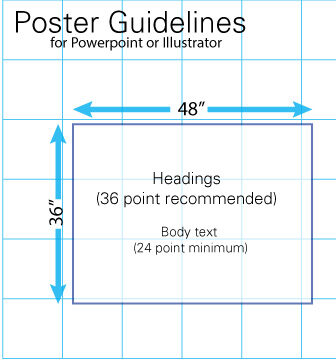
The dimensions of the board are 36 in x 48 in. You will attached your poster to the board with binder clips we provide. Therefore, your poster should fit these dimensions (see image below). If you wish to make your poster vertical, it can’t be wider than 22 in. We will be using tri-fold boards and the sides will have to fold in.
The title of your poster should appear across the top in large letters. Please limit your poster title length. Poster titles using a font size of 60 point will stand out and be easy to read. The minimum font size for poster titles should be 36 point. Below the title put the name(s) of the student author(s), faculty Mentor’s name, and High Point University
You may want to use graphics to fill in empty margins. Consider using the following: Event logo, URCW microscope, URCW logo (black, purple)
Use at least 24 pt font or larger for main text
Posters generally read from left to right and top to bottom in columns
You may wish to use color for highlighting and to make your poster more attractive. Use pictures, diagrams, cartoons, figures, etc., rather than text wherever possible.
Limit the text– people will not read a lot of text — and use bullets instead of paragraphs where there is text.
Your poster should cover the key points of your work. It need not attempt to include all the details; you can have a conversation with people who are interested. The ideal poster is designed to attract attention, provide a brief overview of your work, and initiate discussion.
Be prepared with a a 1.5 minute overview to give your audience context for the poster.
NOTE: a conference is more about what you take away from it than what you bring to it. You should be prepared to attend other posters at the other sessions as you hope people will attend yours.